

Party Matching
Hunting alone is slow and the best grounds are crowded. Party Matching is the board where leaders post who they are looking for and wanderers pick a company. It opens with N or from the main menu F1.
Find a party
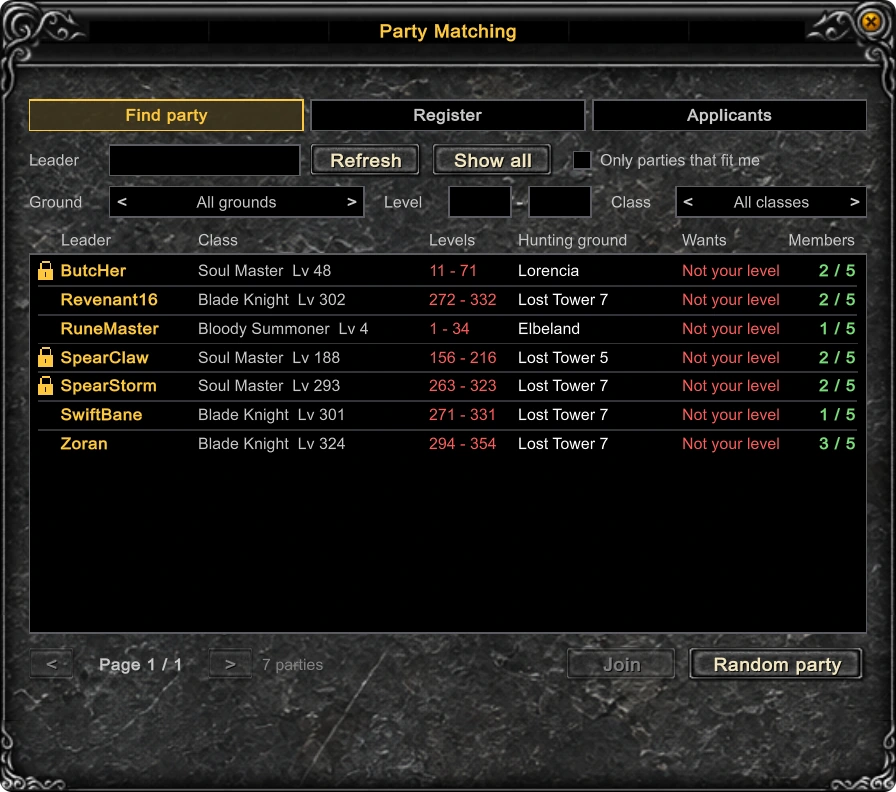
The first tab is the list of parties looking for members: the leader, the levels they want, the hunting ground, the wanted classes and how many of the five places are taken. A padlock marks a party with a password.
- Click a row and press Join. A locked party asks for its four-digit password.
- Random party finds an open party that suits your level and class.
- Only parties that fit me, the ground, level and class filters shorten the list.
- A row you cannot join says why: Full, Not your level or Not your class.
After asking, wait for the leader's answer - or press Cancel request.
Register your party
The second tab lists your own party. Set the level range, tick the classes you want, add a password if the party is for friends only, and choose Auto-accept if anyone who fits may join at once. The listing follows you from map to map.
Applicants
Without Auto-accept every request lands on the third tab, with Accept and Reject beside each name. A chat line tells you when somebody new has asked.
Good to know
- A party holds five players.
- Whatever the listing says, a newcomer must be within 120 levels of every member of the party.
- P opens the party window with each member's map, coordinates and life.
Updated: 08.10.2026
 Helper Alice