

Hunting Log
A good spot is known by its numbers. The Hunting Log sits at the right edge of the screen and counts what the hunt brings while you fight. End switches it on and off; it is also in the main menu F1.
What it counts
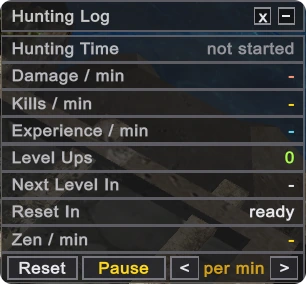
| Row | Meaning |
|---|---|
| Hunting Time | How long the hunt has lasted |
| Damage / min | Damage you dealt |
| Kills / min | Monsters killed |
| Experience / min | Experience gained, master experience included |
| Level Ups | Levels gained during the hunt |
| Next Level In | Time to the next level at this pace |
| Reset In | Time to the level your next reset needs |
| Zen / min | Zen picked up from the ground |
How to read it
- Counting starts by itself with your first hit.
- The rates are those of the last full minute, so they change once a minute. The arrows at the bottom switch them to per hour.
- A change of map starts the minute anew; the hunting time and the levels stay.
- Pause stops the clock, Reset clears everything.
- A click on the header folds the panel to one line.
- The log lives until you leave the game or change character.
It is the quickest way to compare two spots: hunt a few minutes on each and look at Experience / min.
Updated: 08.10.2026
 Helper Alice